While it may seem mysterious at first, Auto-Adjust settings and data from your on-site SLW weather sensor drive more effective and efficient landscape watering.
This feature can be a bit confusing at first, so let's take a few minutes to understand it.
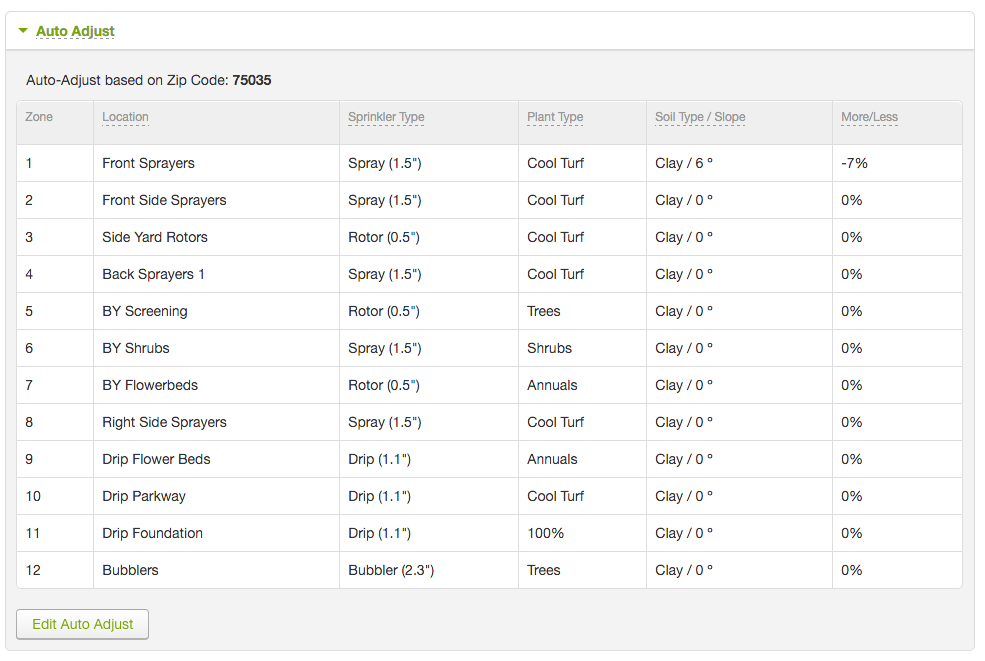
When using the Auto-Adjust mode, you'll define when you want each program to run, but your SmartLine controller calculates how long each zone will operate in order to fulfill the water requirements of the plants living there.
How does this happen? Your SmartLine controller is in constant communication with your on-site SLW weather sensor, receiving up-to-date temperature and rainfall data. The controller, then, uses data about your latitude and your zone-based inputs, such as Plant Type, Soil Type, and Sprinkler Type, to measure the appropriate amount of water for your landscape each day.
The SmartLine controller calculates of how much water your plants need by taking these inputs and parsing them through a formula that determines Evapotranspiration, or ET. ET represents the amount of moisture lost at each zone, each day, and subsequently how much water your irrigation system needs to replace it.
Your controller estimates the watering need for your zones (measured in hundredths of an inch). And, when one of your programs begins to run, it will apply the measured water deficit calculated by this process. In addition, it will periodically stop watering to allow water to soak in before resuming, so that runoff is largely avoided.
To keep the process accurate, always make sure your SLW weather sensor is in good repair, and your auto-adjust settings are fine-tuned.